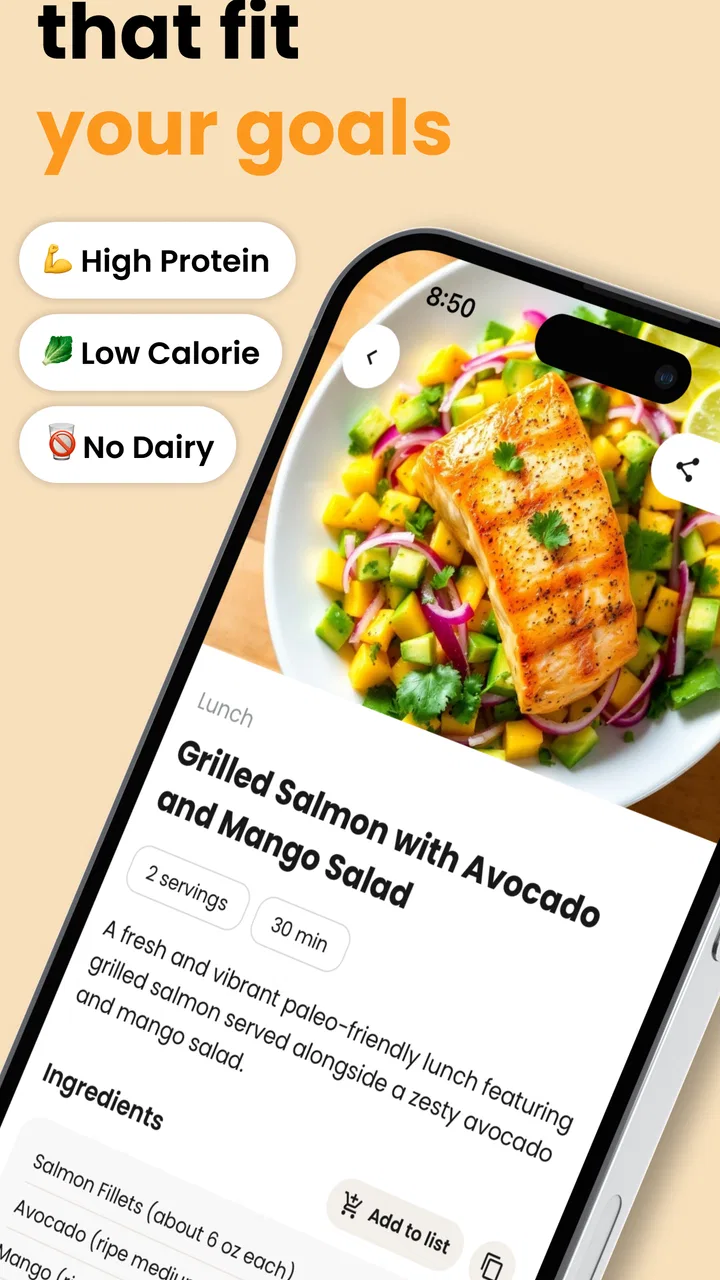
AI Recipe Generator: TasteBot
- 4.4
- Rating
- 10.00K
- Installs
- Free
- Price

 Analysis by App-foxy
I tried TasteBot as a practical food-and-drink companion rather than treating it like a simple recipe shelf. Its main appeal is the way it turns ingredients already sitting in the kitchen into dinner suggestions, then adds cooking guidance around the idea. That makes it more useful on an ordinary weeknight than an app that only shows attractive finished dishes.
The experience is aimed at people who want help deciding what to cook, especially when they have a few unrelated ingredients and no clear plan. I found that focus refreshing. Instead of beginning with a long search for a dish name, I could begin with what I actually had available. The app is free to start, carries an Everyone age rating, and comes from Tastebot, LLC. It has reached over ten thousand installs and holds a 4.4 average from more than three hundred ratings, which suggests a modest but interested user base rather than a crowded mainstream platform.
How TasteBot feels when turning ingredients into a meal
The first thing I noticed is that the app’s value depends on the quality of the information I give it. An ingredient list such as “chicken, rice, carrots, and yogurt” gives the cooking assistant a useful starting point. A vague entry like “some vegetables” is less helpful because there is not enough detail to shape a sensible dinner. That sounds obvious, but it changes how quickly the app becomes useful: a few specific ingredients usually produce a more practical starting point than a rushed, incomplete prompt.
You May Also Like

 AccuWeather: Weather Radar
AccuWeather Review: A Quick, Clear Forecast for Everyday Decisions
For everyday plans, the best forecast is the one you can understand quickly. AccuWeather makes rain timing, radar, and local conditions easy to act on, with a few trade-offs.

 Hill Climb Racing
Why Hill Climb Racing Still Turns Crashes Into One More Run
A tiny car, a bumpy hill and one more upgrade: Hill Climb Racing keeps resurfacing because its simple chaos makes every near-miss feel personal.

 AliExpress - Shopping App
AliExpress Makes Global Shopping Feel Personal, but Shoppers Bear the Risk
AliExpress turns a global marketplace into a pocket-sized discovery engine. Its reach is useful, its shopping loop compelling, and its trade-offs easy to miss.

 Lords Mobile: Kingdom Wars
Lords Mobile Is a Kingdom-Building Routine, Not a Quick Match
A case-by-case verdict on the building, battles, device demands, and social commitments that make Lords Mobile rewarding for some players and exhausting for others.

 PDF Scanner app - TapScanner
TapScanner Makes Paperwork Easier to Capture, Check, and Share
TapScanner makes scanning with a phone feel less like a rescue operation and more like a dependable step in getting work done. Its capture tools are useful, though not flawless.

 Block Blast!
 Shows How Much a Puzzle Game Can Leave Out
A quiet grid game shows why puzzle players increasingly value instant clarity, repeatable skill and low-pressure play—and where the genre still needs to catch up.
More From Our News Desk
View All News


This is also where the app differs from a traditional recipe search. A normal search works best when I already know what I want, such as pasta bake or lentil soup. TasteBot is more suitable when the problem comes first and the recipe comes second. I have ingredients, limited inspiration, or a particular kitchen situation, and I want ideas that fit those circumstances. That makes it especially relevant after grocery shopping, when using leftovers, or when I am trying to avoid buying one more specialty item for dinner.
The suggestions should still be treated as starting points rather than unquestionable instructions. An AI-generated cooking idea can sound convincing while leaving practical questions for the cook: whether a substitute will change the texture, whether a seasoning is too strong, or whether a cooking time needs adjusting for a particular pan. I would read the result carefully, check that the ingredients make sense together, and use normal kitchen judgement before turning on the stove.
Speed expectations before dinner gets stressful
For this kind of app, perceived speed matters more than having a huge library. I do not want to spend several minutes navigating categories when I am hungry and already holding a few ingredients. TasteBot’s ingredient-first concept sets a clear expectation: I should be able to move from a kitchen inventory to a usable idea without doing a long manual search.
That makes the app feel most valuable during the decision stage. It can reduce the mental effort of asking, “What can I make with this?” The benefit is not only the final recipe idea; it is the removal of several small decisions that normally slow me down. I can start with what needs using, then judge whether the proposed meal suits my time, equipment, and appetite.
There is an important trade-off here. A generated answer may be quick to request but still require a thoughtful review. If I am cooking for someone with allergies, following a strict medical diet, or working with raw ingredients that need careful handling, I would not confuse a fast suggestion with professional dietary or food-safety advice. The app can accelerate brainstorming, but it does not remove responsibility from the person preparing the meal.
A useful habit is to enter ingredients in groups: the main protein or vegetable, the starch, the fresh items that are close to expiring, and any strong flavors that should be used carefully. This produces a more realistic brief than listing every condiment in the cupboard. I also found it sensible to mention a constraint directly, such as wanting a quick dinner or needing to use leftovers, when that constraint is central to the decision.
What happens during heavy-use moments
TasteBot is likely to see its busiest personal use when several decisions arrive at once: I have returned from work, the family is hungry, food needs using soon, and I do not want to open several recipe sites. In that situation, the app’s best role is as a narrowing tool. It can help me move from a messy collection of ingredients toward a small number of plausible directions instead of forcing me to compare endless search results.
Another realistic use is weekend preparation. I can look at vegetables, grains, sauces, and leftovers before planning several meals, then use the generated ideas to avoid repeating the same combination. The app is not a replacement for a complete meal-planning system, but it can supply the creative part that many planning tools lack. I would still write down the dishes I actually choose and check the shopping list myself, because the useful result is the decision, not an automatic pantry inventory.
It is also helpful when one ingredient dominates the refrigerator. A large amount of spinach, a surplus of cooked rice, or vegetables that need using can become the starting point for several different meals. The non-obvious advantage is that this reverses the usual recipe workflow. Instead of buying ingredients for a recipe, I can ask the app to work around an ingredient that is already creating pressure in the kitchen.
Heavy use can expose the limits of any AI cooking tool. If I keep changing the ingredient list, adding exceptions, and asking for increasingly narrow variations, I may spend as much time refining the request as I would have spent choosing a familiar recipe. My practical approach is to generate an initial direction, identify what is genuinely useful, and then stop once I have a dish I can cook. Endless prompting is not automatically better planning.
Reliability, recovery, and the need for a human check
My confidence in TasteBot depends less on whether every suggestion is perfect and more on whether the app helps me recover when the first idea is not right. A good cooking assistant should make it easy to reconsider an ingredient combination, replace an item, or take a different direction without making the whole process feel wasted. The ingredient-based premise supports that kind of recovery because the starting point remains my kitchen, not a fixed recipe title.
Still, reliability has two meanings here. The first is technical reliability: whether the app opens, accepts input, and returns a useful result consistently. The second is culinary reliability: whether the proposed meal is sensible for the ingredients, time, and skill involved. I would separate those expectations. Even when the app behaves normally, an AI suggestion deserves the same common-sense review I would give a recipe found through an unfamiliar website.
I would be especially careful with quantities, substitutions, and instructions that affect safety. If a suggestion involves meat, eggs, seafood, or food that has already been cooked once, I would verify preparation and storage decisions independently. The app is strongest at inspiration and organization; it should not be the only authority for allergy management, medical diets, or food-safety questions.
One practical recovery method is to simplify rather than endlessly correct. If the first result combines too many ingredients or assumes equipment I do not have, I would start again with the core items and state the limitation clearly. For example, listing the main ingredient, one side, and “simple stovetop meal” gives the assistant a cleaner problem to solve. This is more efficient than trying to rescue a complicated suggestion line by line.
The app’s current version is 1.3.1, so it is not presented as an untouched first release. That gives me some reassurance that the product has had room to develop, but I would still judge it by the usefulness of the actual cooking flow rather than by version numbering. A stable app that produces ideas I never want to cook is less valuable than a modest tool that consistently helps me make a decision.
Device constraints and everyday practicality
The minimum operating-system requirement is Android 7.0, which gives the app a relatively broad reach among Android devices. That matters for a kitchen tool because people often use an older spare phone or a tablet near the cooking area rather than their newest handset. I would still keep the device in a sensible place, away from splashes and heat, and avoid handling it with wet hands.
The app is free to download, but in-app purchases range from $1.99 to $149.99 per item. That is the most important cost consideration for anyone deciding whether to make it part of a regular cooking routine. I would begin with the free experience, understand what is available without paying, and only consider a purchase if it solves a repeated problem for me. The presence of a high upper purchase range makes it particularly important not to assume that every useful capability is included at no cost.
Resource demands are difficult to judge from the concept alone, and I would not choose the app based on an assumption that it is either extremely light or demanding. In practical use, the bigger concern is workflow friction: how much typing is needed, how quickly I can understand a result, and whether I can keep the device usable while moving between the counter and the stove. A recipe tool earns its place in my kitchen when it reduces interruption rather than creating another screen-based task.
For a small phone, concise ingredient entries are more comfortable than composing a long paragraph. I would prepare the list before opening the cooking flow, using familiar names and avoiding unnecessary detail. On a larger screen, it becomes easier to compare the proposed ingredients with what is physically on the counter. That simple difference can affect whether the app feels like a quick helper or an awkward extra step.
People who need offline access should think carefully about their routine before relying on it. An AI-driven recipe generator is most useful when it can process a request, so I would not treat it as my only kitchen reference in a place with unreliable connectivity. For camping, travel, or a low-signal kitchen, a downloaded cookbook or saved recipes remain the safer backup. TasteBot is better suited to an ordinary connected home where I can ask for a fresh idea at the moment I need one.
Who benefits most from this cooking assistant
I would recommend it first to flexible home cooks who enjoy improvising but want a nudge. It is also a good match for beginners who can prepare basic meals but struggle to combine ingredients confidently. The app gives them a place to start, while the cooking process still teaches them to judge texture, seasoning, and timing for themselves.
It can help households that are trying to waste less food. The useful workflow is to inspect the refrigerator, identify what should be eaten soon, and ask for ideas built around those items. That is more purposeful than browsing recipes and then discovering that half the required ingredients are missing. It may also suit people who cook for one, since a generated direction can be adjusted more easily than a large family recipe copied without thought.
I would not make it my first choice for someone who wants a carefully edited cookbook, tested recipes, detailed nutrition tracking, or a rigid weekly plan. A conventional recipe service is better when consistency, editorial testing, and precise filtering are the priority. Someone with complex allergies or a medically prescribed diet should also use a specialist resource and professional guidance rather than depending on generated suggestions.
The app is less compelling for a confident cook who already has a well-organized collection of trusted recipes and enjoys planning ahead. In that case, the extra step of entering ingredients may not save time. Its advantage appears when inspiration is the obstacle, not when recipe access is already solved.
How it compares with familiar alternatives
Compared with searching the web, TasteBot offers a more direct route from ingredients to an idea. Web searches can provide a wider range of established recipes, but they also bring repeated results, distracting pages, and recipes designed around shopping lists rather than leftovers. TasteBot is more conversational in purpose: I give it the situation, and it helps shape a possible meal.
Compared with a traditional cookbook, the app is more adaptable but less reassuring. A cookbook gives me a recipe that has been deliberately written and tested as a fixed experience. TasteBot gives me flexibility around what I already own, but I need to inspect the result and make adjustments. I would use the app for discovery and a trusted cookbook for dishes where precision matters.
Compared with meal-planning apps, it focuses more on the moment of invention than on long-term organization. It can help me decide tonight’s dinner, but I would not expect that alone to manage a full household schedule, pantry stock, or a carefully balanced week. The strongest setup may be to use TasteBot for ideas, then record the chosen meals in whatever planning method I already trust.
The clearest trade-off is control versus convenience. Search engines and cookbooks give me more control over the exact source and style of a recipe. TasteBot gives me a faster way to explore combinations based on my own ingredients. Neither approach wins in every kitchen, which is why I see this app as a supplement rather than a universal replacement.
My performance verdict after weighing the whole workflow
TasteBot succeeds when I treat it as a quick decision partner for ingredient-led cooking. Its performance is not just about how rapidly an idea appears; it is about whether the result reduces the effort between opening the refrigerator and starting a meal. In that role, the concept is focused and useful. The app’s strongest moment is the ordinary weeknight when I have enough food to cook but not enough inspiration to begin.
I also appreciate that it encourages a more flexible relationship with recipes. Instead of believing every meal must follow a fixed shopping list, I can begin with what needs using and make a reasonable plan around it. That can support less waste, more variety, and a little more confidence for cooks who are still learning how ingredients work together.
The limitations are equally clear. Generated cooking guidance needs human checking, and the app is not the right tool for strict dietary assurance or professionally tested precision. The purchase range means I would inspect the available experience before committing money. People with older devices can meet the Android 7.0 requirement, but anyone planning to cook without dependable access should keep saved recipes as a backup.
After considering those trade-offs, I would recommend TasteBot to anyone who regularly stands in front of a half-full refrigerator and asks what can be made from it. I would skip it if my priority were a curated cookbook, advanced nutrition controls, or a fully managed meal plan. For flexible home cooking, though, it offers a sensible middle ground between random searching and rigid recipes. Its real strength is turning a kitchen problem into a workable starting point, not pretending to replace the cook.
As a free Food & Drink app from Tastebot, LLC, with an Everyone rating and a current version of 1.3.1, it is easy to try without changing the way I shop or cook immediately. I would start with simple ingredient lists, test the suggestions on low-stakes meals, and learn which kinds of prompts suit my kitchen. Used that way, TasteBot feels less like a novelty and more like a practical source of dinner ideas when my own creativity runs out.
FAQs for AI Recipe Generator: TasteBot
01What is AI Recipe Generator: TasteBot, and how does it work?
AI Recipe Generator: TasteBot is designed to create personalized recipe ideas with the help of artificial intelligence. You can typically enter ingredients you already have, select a cuisine or meal type, and adjust preferences such as dietary restrictions. The app then suggests a recipe with ingredients, preparation steps, and cooking guidance. Results may vary, so users should review instructions and ingredient quantities before cooking.
02Can TasteBot create recipes for specific diets and allergies?
TasteBot can be useful for people following common eating preferences, such as vegetarian, vegan, low-carb, or gluten-free diets, depending on the options available in the current version. However, AI-generated suggestions should not be treated as a guarantee that a recipe is completely safe for allergies or medical conditions. Always check every ingredient, including sauces and packaged foods, and avoid recipes that may involve cross-contamination risks.
03Do I need an internet connection to use AI Recipe Generator: TasteBot?
An internet connection may be required for TasteBot to send your request to its AI system and generate a recipe. Some previously viewed recipes could remain available in the app temporarily, but this should not be assumed to work offline. If you plan to use the application while grocery shopping, traveling, or cooking somewhere with unreliable connectivity, it is sensible to save important recipes in advance.
04Are the recipes from TasteBot accurate and suitable for beginners?
TasteBot can provide convenient cooking inspiration, and its step-by-step format may be helpful for beginners. Nevertheless, AI-generated recipes can occasionally contain unusual combinations, unclear instructions, unrealistic preparation times, or inaccurate ingredient proportions. Read the complete recipe before starting, use basic food-safety practices, and rely on your own judgment when handling raw meat, seafood, eggs, or ingredients that require precise cooking temperatures.
05Is AI Recipe Generator: TasteBot free to download and use?
The application may be available as a free download, but some features can require in-app purchases, a subscription, or a limited number of free generations. Pricing, trial periods, advertising, and available tools can change between Android and iOS versions or after updates. Before confirming a purchase, review the store listing and subscription screen carefully, including renewal terms and cancellation instructions.
Pros
- Creates recipe ideas from ingredients you already have.
- Useful for exploring new cuisines and flavor combinations.
- Can help reduce food waste by suggesting ingredient-based meals.
- Simple interface makes recipe discovery quick and accessible.
- Helpful for planning meals when you lack cooking inspiration.
Cons
- Generated recipes may need adjustments for taste or portion size.
- Ingredient substitutions are not always practical or accurate.
- Some suggestions may require uncommon or expensive ingredients.
- Nutritional details may be limited or unavailable for certain recipes.
- Results depend heavily on how clearly you describe your ingredients.

AI Recipe Generator: TasteBot
Gallery